
Scoring sessions
Every session, scored on a phone
The therapist opens the session on a phone, scores the programmes worked on and writes a note. Each programme has its own scoring method, chosen by the centre.
30 days free. No card required to sign up.
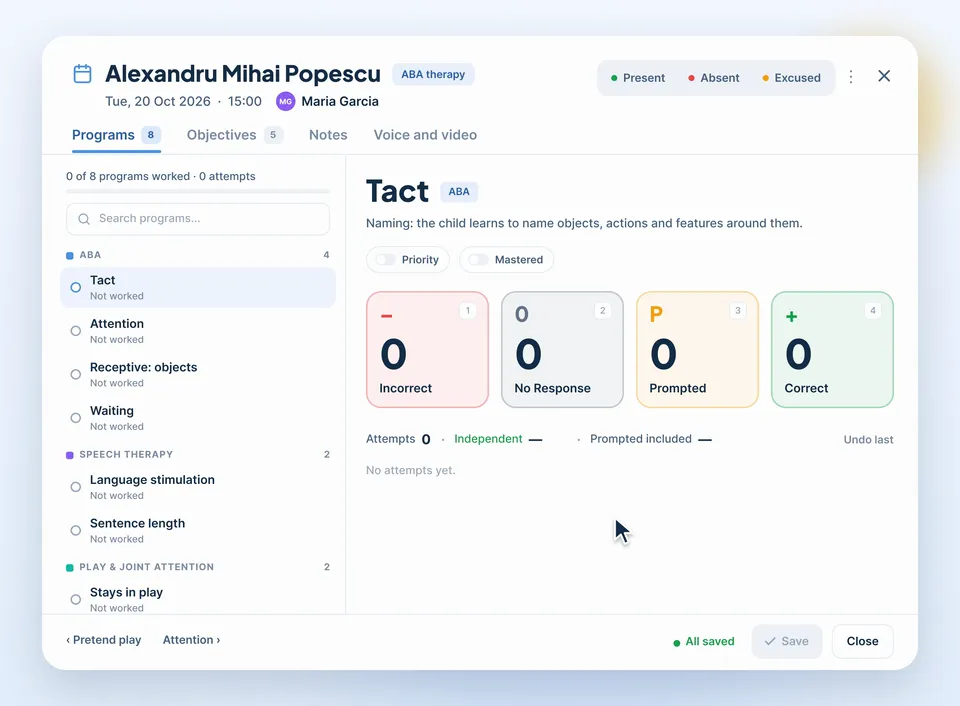
The scoring methods
Six methods, one for each programme
- Trials
- Speech
- Level of help
- Count
- Time
- Rating 0–10
The right method for each programme
By trials, by the steps of speech therapy, by level of help, as a count, as a time with the stopwatch or as a rating from 0 to 10.
The programmes belong to the centre
The list of therapies and programmes is yours: add every programme you need.
Notes, clips and voice notes
In the session you write notes on each programme and each objective, and you can record a clip or a voice note.
How it connects to the rest of the platform
The chart grows from sessions
Progress for each programme is worked out from what was scored. Nothing is filled in separately.
Parents see the session
The programmes worked on, their scoring and the notes show in the parent portal. Notes marked “Staff only” stay with the team.
Objectives, close at hand
In the session you also see the child’s objectives from the intervention plan.


Frequently asked questions
Do therapists score during the session or after it?
As they prefer: in the session or straight after it, on a phone or a tablet.
What does the independence score mean?
When scoring by level of help, each try is worth 0, 33, 67 or 100, from full help to independent, and the score is their average. It is not the percentage of independent tries: with minimal help on every try, the score is 67.
What do parents see of the scoring?
The programmes worked on and how they went, on that session, plus the notes you did not mark “Staff only”.
Try TempoApp free for 30 days
No card at signup. We move your data from Excel for you, in 48 hours.