
Progress and reports
Each child’s progress, worked out from the sessions
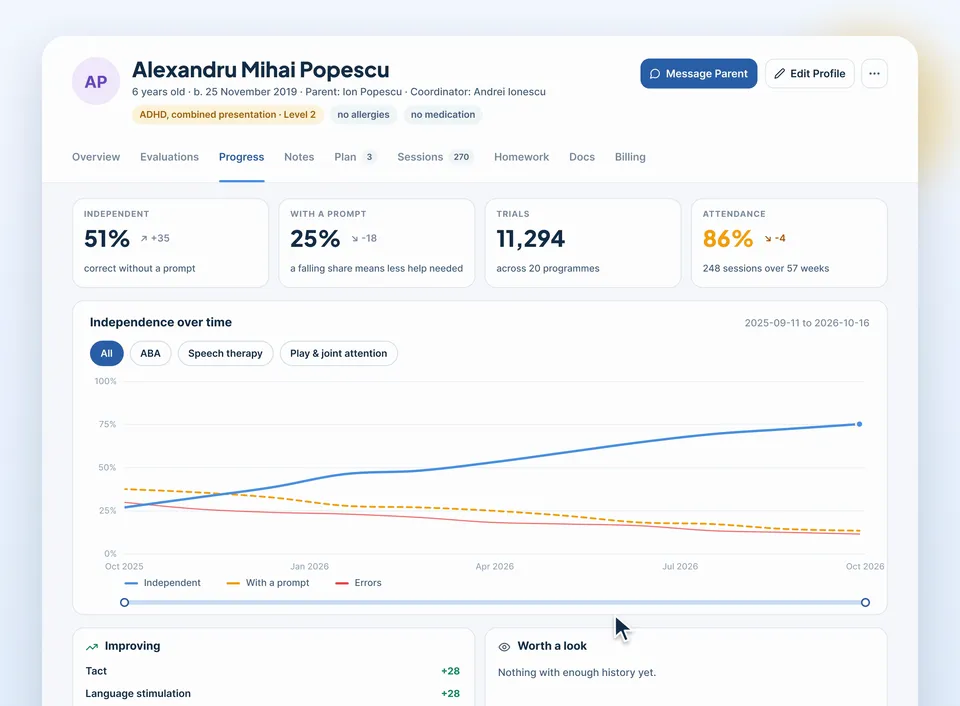
Nothing is filled in separately: the chart grows from the scored sessions. You see progress for every programme and every therapy, and at the end of the month you have the child’s report.
30 days free. No card required to sign up.
How to read it
The same picture, for the team and for parents
By programme and by therapy
Each programme has its own chart, and therapies can be looked at separately: ABA, speech therapy or any other on the centre’s list.
Parents see the same thing
In the portal, the parent has the same picture of progress that the clinic sees, for every programme.
A monthly report for each child
At the end of the month, the child’s progress report can be sent to the parents.
How it connects to the rest of the platform
Speech steps, read correctly
In speech therapy, the percentage is worked out from the “Correct” tries at the step the child is working on now.
Evaluations compared over time
Two evaluations of the same kind are put side by side: what improved, what stayed the same and what to watch.
More or less
For a count, a time and a rating you choose the direction: for a behaviour to reduce, progress means less.

Frequently asked questions
Where does the data in the chart come from?
From the scored sessions. A session with no scoring does not change the chart.
Do parents see the progress?
Yes, in the portal, for every programme, and they can pick a therapy.
Can the reports be printed?
Yes. The “How it works” page has two sample reports, exactly as they come out.
Try TempoApp free for 30 days
No card at signup. We move your data from Excel for you, in 48 hours.